
Facebook Automotive Inventory Ads (AIA) are dynamic ad formats that automatically pull your live vehicle catalog and display personalized ads to in-market buyers on Facebook and Instagram. Every ad populates with the vehicle's photo, year, make, model, price, and mileage directly from your inventory feed. No manual creative work per unit. When a vehicle sells or a price changes, the ad updates automatically, preventing the customer disappointment that comes from stale listings.
Three components make AIA work:
- Facebook Catalog in Commerce Manager, populated with structured vehicle data
- Meta Pixel or SDK installed on your website to track user behavior and enable retargeting
- Meta Ads Manager linking the catalog to live campaigns targeting in-market buyers
The performance case is real. Dealerships running AIA typically see significantly lower cost per lead than standard image ads because targeting is intent-based. Facebook reaches buyers weeks before they run a Google search, making AIA a demand generation channel, not a demand capture one.
Table of Contents
- How to set up Facebook Automotive Inventory Ads correctly
- Strategic best practices that actually move inventory
- How to measure AIA performance and hold vendors accountable
- Key Takeaways
How to set up Facebook Automotive Inventory Ads correctly
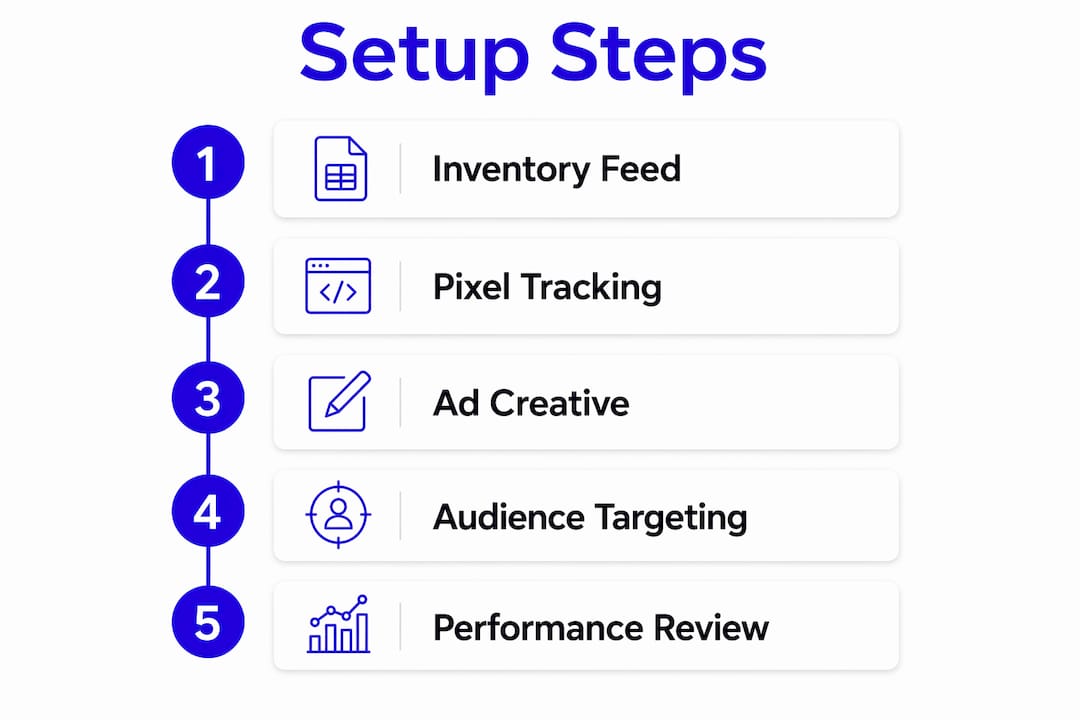
A clean setup is the single biggest factor separating high-performing AIA campaigns from wasted spend. Follow these steps precisely.
-
Create a Facebook Catalog in Commerce Manager. Go to Commerce Manager, select "Create a Catalog," and choose "Vehicles" as the catalog type. Name it clearly by rooftop.
-
Upload a structured vehicle feed. Your feed must include required attributes:
state_of_vehicle,make,model,trim,vin,body_style,price,mileage, and image URLs. Accepted formats are CSV, TSV, RSS XML, or ATOM XML. An RSS feed that auto-refreshes from your DMS is the most reliable option for keeping data current. -
Create vehicle sets. Segment your catalog into sets by vehicle type, such as SUVs, trucks, or sedans. Segmented vehicle sets allow tailored messaging for different buyer profiles within a single catalog.
-
Install the Meta Pixel on your website. The Pixel is the tracking foundation for AIA. It enables conversion tracking and powers retargeting by logging which vehicle detail pages (VDPs) each visitor viewed. If you run a mobile app, use the Meta SDK instead.
-
Link the Pixel to your catalog. In Business Settings, go to Data Sources, select your catalog, click "Associate Sources," and connect your Pixel. This connection is what allows Meta to match a shopper's browsing behavior to specific inventory units.
-
Enable the Special Ad Category. Meta requires all automotive ads involving credit or financing to run under the Special Ad Category. This affects audience targeting options and reporting capabilities, so account for it before launch.
-
Build your campaign in Ads Manager. Select "Catalog Sales" as the campaign objective, choose your vehicle catalog, set your budget, select a vehicle set, and define your audience. You can target broadly or retarget VDP visitors specifically. Single, carousel, and collection formats are all supported.
Pro Tip: Set your inventory feed to refresh at least every 24 hours. Stale data, broken image URLs, and missing pricing are the most common causes of ad rejections and underperformance.

Strategic best practices that actually move inventory
Automation handles the creative work, but strategy determines whether AIA drives real sales. John Nelson at 9 Clouds makes the point directly: automotive advertising on Meta has become more automated, which means the basics matter more than ever, not less. A clean vehicle catalog, accurate content IDs, and a website that converts visitors are the real levers.
Key practices that separate high-performing campaigns from mediocre ones:
- Treat catalog hygiene as a daily operational task. Missing prices, outdated mileage, and broken image links cause ad rejections and erode campaign performance quietly. Audit your feed weekly.
- Combine Reels with AIA for a full-funnel approach. DealerSmart's creative playbook recommends short-form video alongside inventory ads. Reels build brand trust and attention; AIA closes the loop with VIN-specific units. Running only one without the other leaves money on the table.
- Do not treat Facebook like Google Search. Facebook leads arrive earlier in the buying cycle than search leads. They require faster, more persistent follow-up. A lead that goes cold after 24 hours is a campaign failure, not a channel failure.
- Shift your success metric from cost per lead to cost per sale. Cost per lead is easy to game. Cost per sale, calculated by connecting CRM data to Meta reporting, tells you whether the channel is actually moving metal.
- Your website experience is part of the ad. A slow VDP or a broken lead form kills the conversion that AIA worked to generate. The ad gets the click; the website closes it.
How to measure AIA performance and hold vendors accountable
The most common mistake dealership leaders make is evaluating AIA performance using only the metrics Meta's Ads Manager surfaces by default. Those numbers, clicks, impressions, and cost per lead, can look strong while the campaign produces little actual revenue.
Meaningful KPIs for AIA campaigns, in order of strategic value:
- Link click-through rate (LCTR) and cost per link click (CPLC): These show whether ads are driving real website traffic to VDPs and lead forms, not just generating passive impressions.
- Cost per lead form submission: Tracks how efficiently traffic converts into identifiable hand-raisers tied to specific inventory.
- Cost per offline lead and cost per offline sale: The most defensible metrics. At 9 Clouds, these are calculated by uploading CRM data into Meta so ad performance ties back to real sold vehicles. Industry benchmarks indicate that cost per offline lead and cost per offline sale vary depending on market conditions and dealership specifics.
Closed-loop reporting requires CRM integration with Meta offline conversion tracking. Without it, you are measuring activity, not outcomes. An ad can look efficient at the platform level while failing to produce quality dealership results.
Privacy and compliance matter here too. The Special Ad Category limits certain audience signals, which affects how Meta attributes conversions. Factor that into your benchmarking expectations and make sure your vendor understands it.
Troubleshooting starts with two audits: feed quality and Pixel function. If LCTR drops or cost per link click spikes, check whether the feed is showing the right units, whether pricing is current, and whether image quality has degraded. If offline conversion data stops flowing, verify the Pixel is firing correctly on VDP and lead form pages.
Pro Tip: Do not wait for a vendor to bring you performance data. Pull your own CRM-connected reports monthly and compare them against what your agency reports. Unexplained gaps between Meta-reported leads and CRM-recorded leads are a signal worth investigating. Autoroiq's vendor accountability framework gives you the structure to do this systematically.
Key Takeaways
Facebook Automotive Inventory Ads deliver measurable results only when clean inventory data, proper Pixel tracking, and CRM-connected reporting work together from day one.
| Point | Details |
|---|---|
| AIA automates personalized ads | Meta pulls live inventory data to show each buyer vehicles matched to their browsing behavior. |
| Feed hygiene drives performance | Stale pricing, broken images, and missing VINs cause rejections and quietly erode campaign results. |
| Full-funnel creative wins | Combining Reels for awareness with AIA for retargeting outperforms running inventory ads alone. |
| Cost per sale is the real metric | CRM-integrated reporting connects Meta spend to actual sold vehicles, replacing misleading cost-per-lead figures. |
| Vendor accountability requires your own data | Offline conversion tracking and independent analysis reveal gaps that platform-level reports routinely obscure. |