To reliably measure what your Google Business Profile delivers, use native Business Profile insights plus a GA4 link, UTM-tag your profile links, add call tracking that preserves your local number, and use the Business Profile Performance API or CSV exports for multi-location reporting. That combination closes the gaps that any single tool leaves open: native insights show volume, GA4 adds context, UTMs stop misattribution, and call tracking connects a click to a closed sale.
Do these three things right now, in this order:
- Verify and sign in. Confirm your Business Profile is verified and you're logged into the Google Account that manages it, since performance data won't load otherwise.
- Check current interactions. Open Performance and write down this month's calls, direction requests, and website clicks as your baseline.
- Add UTMs to your website link. Tag the URL on your profile before you do anything else with GA4 or paid campaigns.
This sequence matters because quick checks catch dead links or expired verification before you spend time on attribution setup. Fix visibility first, fix measurement second, then scale reporting once both are solid.
Key Takeaways
Accurate Google Business Profile tracking requires native insights, a GA4 link, UTM-tagged links, NAP-safe call tracking, and API or CSV exports for scale, used together rather than in isolation.
| Point | Details |
|---|---|
| Layer your tracking methods | Combine native insights, GA4 linking, UTMs, and call tracking rather than relying on one tool alone. |
| Tag every profile link | Apply consistent UTM parameters to prevent website clicks from misreporting as Direct traffic in GA4. |
| Protect your NAP | Keep your real number as primary and add tracking numbers as an additional field, never a replacement. |
| Export before retention expires | Move GBP data to Looker Studio or BigQuery before GA4's six-month retention window erases history. |
| Reconcile weekly | Match call-tracking logs against GBP call clicks on a weekly cadence to catch data gaps early. |
Table of Contents
- What Google Business Profile Tracking Actually Measures
- How Do You Check Business Profile Performance Right Now?
- Linking GBP to Google Analytics 4: Setup and What You'll Actually See
- Why UTM Tags Matter for Your Business Profile Links
- Setting Up Call Tracking Without Hurting Your Local Ranking
- When Should You Use the Business Profile Performance API?
- How to Spot Bad Data Before It Wrecks Your Report
- How AutoROIQ Applies This to Dealership ROI Reporting
- What Actually Moves the Needle on GBP Tracking
- Sources
What Google Business Profile Tracking Actually Measures
Google Business Profile tracking covers nine core metrics, and each one signals a different stage of customer intent. Confusing them is the single biggest reason dealership marketing teams and local business owners misjudge what their listing is actually doing for them.
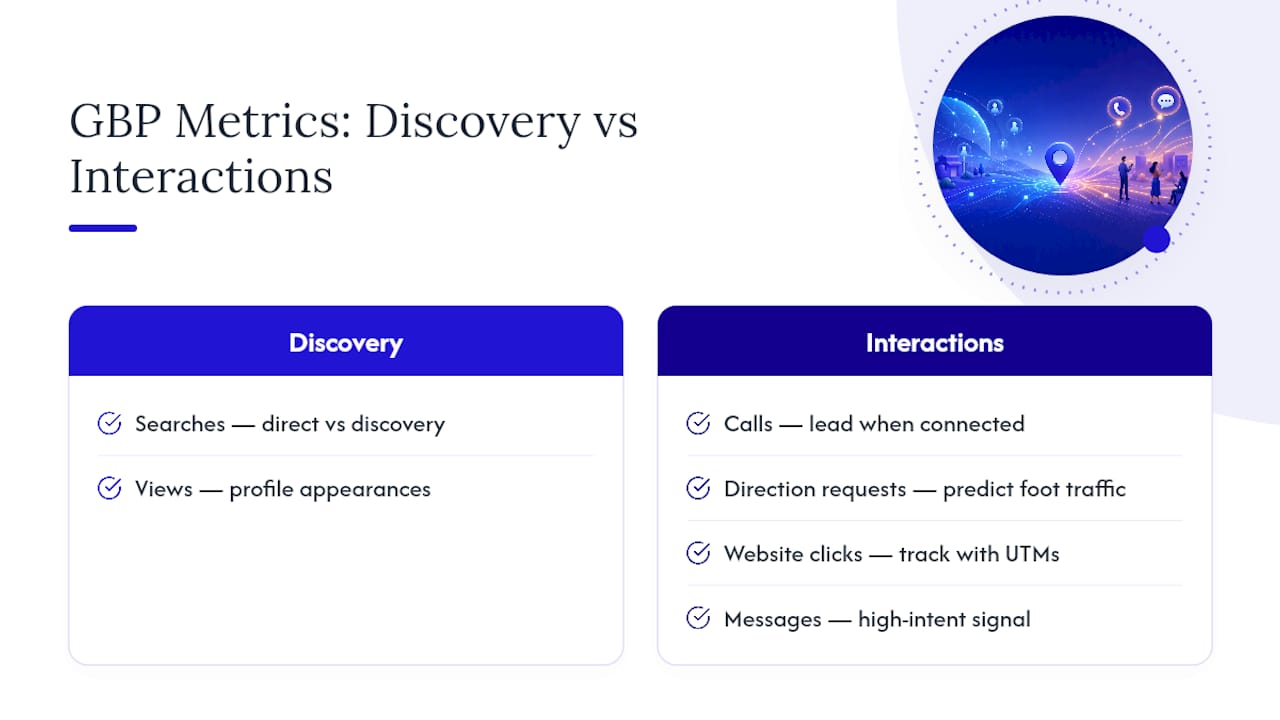
Searches and views measure discovery: how often your profile surfaces in a direct search for your business name versus a discovery search for a category or product. Interactions is the umbrella term for what happens next, calls, direction requests, website clicks, messages, bookings, and menu or product views.
Each interaction maps to a different downstream outcome. A call is a lead the moment it connects. A direction request predicts foot traffic, useful for retail and restaurants but less telling for service businesses that book by phone. Website clicks only matter if the landing page converts, which is why pairing them with UTMs (covered below) turns a raw click count into a trackable path. Messages and bookings are the highest-intent signals on the list, since a customer completing either has already decided to engage.
Update cadence varies by metric, and this trips up a lot of reporting schedules. Interaction data typically lags three to four days, while search query data updates monthly and can take up to five days to appear. Google has also confirmed that profile insights are built from public, location-based signals like reviews, photos, and local search trends, which is why a listing's numbers can shift without any change on your end.
For reporting rhythm: check interaction metrics weekly since they refresh fast enough to catch problems early, and reserve search-term analysis for monthly reviews, since that data moves slower and rewards a longer view.
How Do You Check Business Profile Performance Right Now?
You have three native paths, and each fits a different situation.
- Search. Sign into the Google Account tied to your profile, search your business name, and open the Business Profile panel. Click Performance to see a dashboard with adjustable date ranges, usually seven, 28, or custom windows.
- Maps. Open the Google Maps app, tap Business, then Performance, for the same core metrics in a mobile-friendly layout, handy for a manager checking numbers between appointments.
- Bulk download. In Business Profile Manager, select multiple locations and export a CSV. Expect columns for date, location ID, metric type, and value, structured for a spreadsheet pivot table rather than a presentation-ready chart.
Both Search and Maps show the same underlying data, just formatted differently. The CSV export is where multi-location operators actually start doing analysis, since comparing ten locations inside the native dashboard one at a time isn't practical.
Pro Tip: If you're checking performance for a single location and just need a monthly sanity check, native Search or Maps views are enough. The moment you're comparing locations or need a rolling twelve-month trend, that's your signal to move to GA4 linking or the API.
Linking GBP to Google Analytics 4: Setup and What You'll Actually See
Linking your Business Profile to GA4 requires GBP owner or manager access on your end and GA4 Editor or Admin permissions on the property you're linking to. The connection lives under GA4's Admin panel, in the Business Profile linking section, where you select the verified profile and confirm the property to receive the data.
Once linked, seven local interaction metrics flow into GA4's Standard Reports: interactions, website clicks, calls, direction requests, messages, bookings, and menu views. These map cleanly onto funnel stages, discovery through website clicks, consideration through calls and messages, and conversion through bookings, so a marketing manager can finally see a GBP interaction sitting next to session data from other channels.
Three limits matter more than the setup steps themselves:
- Aggregation. If you link multiple profiles to one GA4 property, metrics combine rather than break out by location, which erases the granularity multi-location operators need most.
- Six-month retention. GBP metrics roll off after six months, a much shorter window than GA4's standard event retention.
- Standard Reports only. You cannot pull GBP metrics into GA4 Explorations, and subproperties aren't supported at all.
Link at the root GA4 property rather than a subproperty, since subproperties won't receive the GBP data at all. And build a habit of exporting to Looker Studio or BigQuery well before six months pass, because that history disappears permanently once the retention window closes. GA4 linking is a visibility upgrade, not an attribution engine on its own, which is exactly why UTMs matter so much for the next step.
Pro Tip: Set a recurring quarterly calendar reminder to export GBP data to Looker Studio. Waiting until month five to think about retention means you're already scrambling.
Why UTM Tags Matter for Your Business Profile Links
Without UTM parameters, clicks from your Business Profile website button often land in GA4 as "Direct" traffic, because the referrer information gets stripped somewhere in the mobile app or Maps redirect chain. That single misclassification quietly erases your ability to prove the listing drives traffic at all.
- Tag the website button on your profile with a consistent parameter set:
utm_source=google&utm_medium=local_profile&utm_campaign=profile_website. - Tag booking and appointment links the same way, swapping the campaign value to something like
utm_campaign=profile_bookingso you can separate booking-intent clicks from general browsing. - Tag Posts and offers individually, using a descriptive campaign name tied to the specific promotion, for example
utm_campaign=spring_service_offer.
A full example: https://yoursite.com/?utm_source=google&utm_medium=local_profile&utm_campaign=profile_website. Practitioner guidance consistently points to this exact fix for the Direct-traffic misattribution problem, and you can verify it worked by checking GA4's traffic acquisition report for a new local_profile medium showing up instead of an unexplained spike in Direct.
Watch for two practical snags. Some mobile views truncate long URLs, so keep parameters short and consider a redirect service if your link becomes unwieldy. And always test the tagged link inside the actual Google Maps app before publishing, since app-based rendering sometimes handles query strings differently than a desktop browser.
Pro Tip: Keep a shared spreadsheet of every UTM combination you've used on your profile. Six months from now, you'll be glad you didn't have to reverse-engineer what "spring_promo2" meant.
Setting Up Call Tracking Without Hurting Your Local Ranking
Swapping your visible phone number for a tracking number is a common mistake that puts your NAP (name, address, phone) consistency at risk, and inconsistent NAP data is one of the more avoidable ways local businesses lose search visibility. The safer pattern: keep your real, publicly listed number as the primary phone field on your profile, then add the tracking number as an additional number rather than a replacement.
Track three things at minimum: call volume, call duration, and missed-call rate. Duration tells you more about lead quality than volume alone does, since a 12-second hang-up and a four-minute conversation are not the same lead. If your call-tracking platform records calls, confirm your state's consent requirements before storing or reviewing them, since recording laws vary and this is a compliance detail worth getting right the first time.
- Use a tracking number with a local area code, matching your business's actual region.
- Format the number identically everywhere it appears (profile, website, directories).
- Run an end-to-end test call before going live to confirm routing and recording work.
- Reconcile call logs against GBP call clicks weekly to catch tracking gaps early.
For a deeper walkthrough on choosing a call-tracking vendor and configuring it correctly, see this call tracking guide for dealerships, which covers vendor selection in more detail than fits here.
When Should You Use the Business Profile Performance API?
Move from dashboards to the API once you need a daily time series, per-location keyword impressions, or a dashboard that consolidates ten, fifty, or five hundred locations without manual CSV wrangling.
The Performance API returns both daily and monthly metrics, plus a search-keyword-impressions endpoint that shows which search terms actually triggered your listing to appear. For multi-location operators, this keyword-level detail is something no native dashboard exposes, which is why the API functions as the closest thing to a gold standard for enterprise-grade local reporting.
Quota is the first hurdle. Some accounts start with a default quota of zero calls, meaning you'll need to submit a quota increase request through Google Cloud Console before pulling any data. Budget a few days for approval, and use Google's official client libraries where available rather than building raw REST calls from scratch, since the libraries handle authentication refresh automatically.
A workable pipeline looks like this: schedule a daily API pull into BigQuery, enrich each row with campaign or UTM metadata at ingest time, keep a rolling partitioned table for fast year-over-year queries, then build Looker Studio dashboards on top for executive-level reporting. This is also your best defense against GA4's six-month retention wall, since the API pull, done early enough, preserves history GA4 would otherwise discard.

How to Spot Bad Data Before It Wrecks Your Report
Website clicks showing up as Direct traffic almost always trace back to missing UTMs on your profile links, not a tracking failure on Google's end. Fix the tags and the misattribution usually clears on the next reporting cycle.
Aggregation is the second common trap: if several locations share one GA4 property, their metrics blend together and location-level detail disappears. Either split properties per location or shift that reporting need to the API, which preserves per-location granularity by design.
Run this validation checklist monthly:
- Compare call-tracking vendor logs against GBP call-click counts and flag any gap wider than your normal variance.
- Match GA4 landing page sessions against GBP-reported website clicks for the same date range.
- Spot-check your actual search ranking manually for two or three core terms to confirm what the dashboard says lines up with reality.
Weekly reconciliation between call logs and GBP data catches discrepancies before they compound into a quarter's worth of bad reporting.
How AutoROIQ Applies This to Dealership ROI Reporting
AutoROIQ builds vendor accountability scorecards by combining GBP interaction data, call-tracking logs, and channel-level spend into one reconciled view, so a dealership's marketing director can see exactly which source produced which lead.
- GBP metrics get cross-checked against call and website data before they ever reach an executive summary.
- Multi-location dealer groups benefit most, since vendor reports rarely agree with each other on the same numbers.
- An independent intelligence advisor earns its cost fastest when vendor disputes or reporting inconsistencies make in-house numbers hard to defend.
What Actually Moves the Needle on GBP Tracking
Most advice on this topic treats Google Business Profile tracking as a checklist of settings to enable once. The research behind this guide points to something different: tracking accuracy decays continuously, through retention windows closing, aggregation swallowing location detail, and UTMs that get dropped the next time someone redesigns the website. Treating it as a one-time setup is the conventional mistake.
What deserves priority is the reconciliation habit, not the tools themselves. A dealership or local business with mediocre tools but a disciplined weekly habit of matching call logs to GBP data will out-report a business with every integration switched on and nobody checking the numbers against reality. The API and GA4 linking matter, but they're infrastructure. The validation checklist is where trustworthy reporting actually gets made.
If you take one thing from this guide, prioritize the reconciliation step before the technical integrations. Get that habit right first, then build the pipeline around it.
— AutoROIQ
Sources
- Understand your Business Profile performance & insights — Google Business Profile Help
- Top 8 Google Business Profile Metrics to Track in 2026 — AgencyAnalytics